# Operating System Concept: CPU Scheduling
## Background
One of the purposes of an OS is to run multiple programs for users with a limited number of processors. We also want to maximize CPU productivity under different kinds of use cases.
### CPU burst and IO burst
A CPU burst is a period where a program executes computation instructions.
An IO burst is a period where execution waits for an IO request to complete.
If a program tends to have longer CPU bursts, we call it CPU-bound. Otherwise, we call it IO-bound.
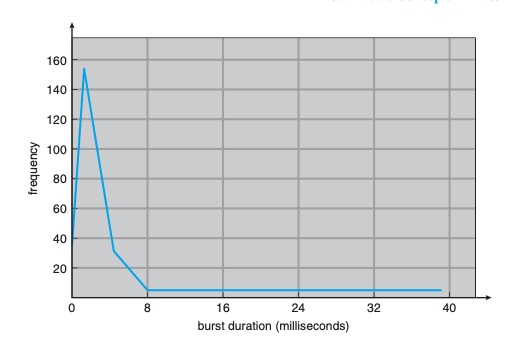
The general histogram of CPU burst:
Operating System Concepts 9th
This distribution is important when selecting a scheduling algorithm. Typically, IO-bound tasks have many short CPU bursts, while CPU-bound tasks have fewer but longer CPU bursts.
### How multi-program running on single processor?
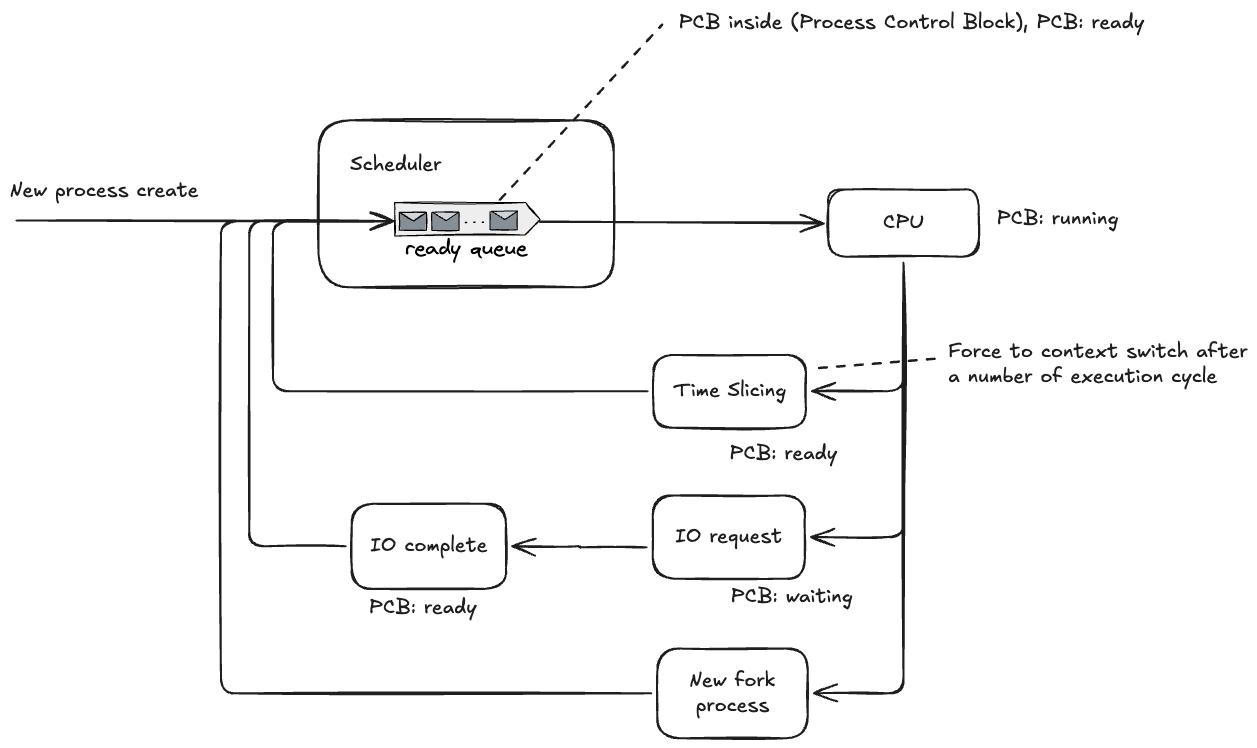
The next CPU bursts line up in the ready queue. Each queue entry represents a process control block (PCB), which records process state such as register values, program counter, and stack pointer.
To support multiprogramming on one CPU, the OS switches processes either after a time slice expires (preemptive scheduling) or when the running process blocks/finishes.
If a process issues an IO request, it moves to the waiting (blocked) state instead of staying in ready. After the IO completes, it is moved back to the ready queue.
## Scheduling Criteria
In the real world, no single scheduling algorithm fits all scenarios.
Different use cases optimize different criteria.
### CPU utilization
We usually want to keep the CPU as busy as possible while doing useful work (often around 40% to 90%, depending on workload).
### Throughput
The number of processes completed per time unit.
### Waiting time
The total time a process spends in the `ready` queue.
### Turnaround time
The total time from process submission to completion. (Ready queue + IO waiting + CPU execution)
### Response time
How long it takes before a process gets its first CPU time, usually used for interactive systems. (First run start time - Arrival time)
## Scheduling Algorithm
**Non-preemptive scheduling**: The running process cannot be switched out unless it blocks (for example, on IO) or terminates.
**Preemptive scheduling**: The running process can be switched out by time slicing or by the arrival of a higher-priority process.
### FCFS
First-Come, First-Served belongs to non-preemptive scheduling. If a long CPU-bound process comes first, waiting time and response time can become poor (convoy effect). It is suitable for simple batch jobs.
### SJF
Shortest Job First (SJF) is usually non-preemptive: the process with the shortest next CPU burst runs first. It generally gives better average waiting time because short (often IO-bound) jobs do not wait behind long CPU-bound jobs.
The preemptive version is **Shortest Remaining Time First (SRTF)**.
**Burst-time prediction**: `tau(n+1) = alpha * t(n) + (1 - alpha) * tau(n)`, where `0 <= alpha <= 1`.
### Round Robin
Round Robin applies time slicing. It is suitable for interactive systems because it usually provides good response time.
### Priority Scheduling
Low-priority tasks have a risk of starvation. A common solution is aging.
**Aging mechanism**: If a process has waited too long, gradually increase its priority.
### Multilevel Queue Scheduling
Separate tasks into multiple queues. Each queue can use a different scheduling algorithm.
Queues are assigned fixed priorities from high to low, and higher-priority queues are served first.
### Multilevel Feedback Queue Scheduling
The problem with `Multilevel Queue Scheduling` is inflexible priority assignment. Tasks placed in low-priority queues may starve.
`Multilevel Feedback Queue Scheduling` allows tasks to move between queues based on behavior and waiting time (for example, with aging), improving fairness.